UGUI 源码地址 https://docs.unity3d.com/Packages/com.unity.ugui@1.0/api/index.html ——
UIBehavior类及其派生类
UGUI系统中所有的UI组件都是派生自抽象类UIBehavior.
比如Button组件派生自UIBehavior下的Selectable,Image组件派生自UIBehavior下的Graphic下的MaskableGraphic.
用四种方法实现点击逻辑
1.直接利用unity的Button组件界面的On click()绑定
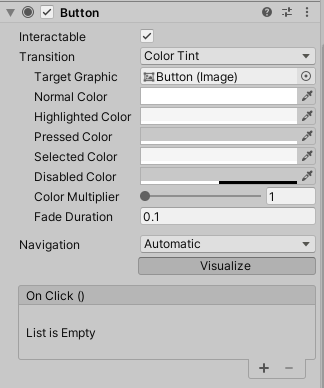
缺点:只能左键单击,多人开发时仅通过代码看不出这里绑定了事件;
优点:直观,操作快捷。
2.通过代码里AddListener()
    private Button button;
    void Start()
    {
        button = GetComponent<Button>();
        button.onClick.AddListener(Action);
    }
这里关注一下onClick是什么,点进UI.Button看到。
        public ButtonClickedEvent onClick
        {
            get { return m_OnClick; }
            set { m_OnClick = value; }
        }
找到m_OnClick的定义。
        public class ButtonClickedEvent : UnityEvent {}

        // Event delegates triggered on click.
        [FormerlySerializedAs("onClick")]
        [SerializeField]
        private ButtonClickedEvent m_OnClick = new ButtonClickedEvent();
发现m_OnClick本质是UnityEvent,怪不得上面用的是AddListener,那么Invoke理论上应该在按下后触发,我们继续看。
        private void Press()
        {
            if (!IsActive() || !IsInteractable())
                return;

            UISystemProfilerApi.AddMarker("Button.onClick", this);
            m_OnClick.Invoke();
        }
果然在Press函数这里找到了Invoke(),表示按下后触发。
继续看点击事件,Button是Selectable的子类,并继承了IPointerClickHandler这个接口,要实现OnPointerClick方法。
public class Button : Selectable, IPointerClickHandler, ISubmitHandler
{
	...
		private void Press()
		{
			if (IsActive() && IsInteractable())
			{
				UISystemProfilerApi.AddMarker("Button.onClick", this);
				m_OnClick.Invoke();
			}
		}

		public virtual void OnPointerClick(PointerEventData eventData)
		{
			if (eventData.button == PointerEventData.InputButton.Left)
			{
				Press();
			}
		}
这里可以很明白的看出来只有左键单击,保证勾选激活,且可交互的条件下才会触发回调。 那么利用类似IPointerClickHandler的EventSystems可以拜托Button组件的束缚,给任何一个UI添加事件。
3.通过EventSystems添加事件
继承事件接口,并实现对应方法。 以“左右键单击”和“拖拽”为例。
using UnityEngine;
using UnityEngine.EventSystems;

public class Image_event : MonoBehaviour, IPointerClickHandler, IBeginDragHandler, IDragHandler
{
    public void OnPointerClick(PointerEventData pointerEventData)
    {
        //Use this to tell when the user right-clicks on the Button
        if (pointerEventData.button == PointerEventData.InputButton.Right)
        {
            //Output to console the clicked GameObject's name and the following message. You can replace this with your own actions for when clicking the GameObject.
            Debug.Log(name + " Game Object Right Clicked!");
        }

        //Use this to tell when the user left-clicks on the Button
        if (pointerEventData.button == PointerEventData.InputButton.Left)
        {
            Debug.Log(name + " Game Object Left Clicked!");
        }
    }


    public void OnBeginDrag(PointerEventData pointerEventData)
    {
        Debug.Log("OnBeginDrag");
        if (pointerEventData.button == PointerEventData.InputButton.Right)
        {
            Debug.Log(name + " Game Object Right Draged!");
        }
        if (pointerEventData.button == PointerEventData.InputButton.Left)
        {
            Debug.Log(name + " Game Object Left Draged!");
        }
    }

    public void OnDrag(PointerEventData eventData)
    {
        Debug.Log("OnBeginDrag");
    }

    public void OnEndDrag(PointerEventData eventData)
    {
        Debug.Log("OnBeginDrag");
    }
}
注意:其中IBeginDragHandler接口必须先实现IDragHandler 文档里注明了这点
4.利用Event Trigger组件
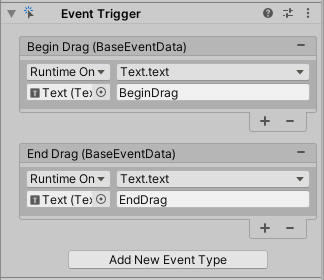
在组件上右键Edit Script进入EventTrigger.cs
    public class EventTrigger :
        MonoBehaviour,
        IPointerEnterHandler,
        IPointerExitHandler,
        IPointerDownHandler,
        IPointerUpHandler,
        IPointerClickHandler,
        IInitializePotentialDragHandler,
        IBeginDragHandler,
        IDragHandler,
        IEndDragHandler,
        IDropHandler,
        IScrollHandler,
        IUpdateSelectedHandler,
        ISelectHandler,
        IDeselectHandler,
        IMoveHandler,
        ISubmitHandler,
        ICancelHandler
        ...
        private void Execute(EventTriggerType id, BaseEventData eventData)
        {
            var triggerCount = triggers.Count;

            for (int i = 0, imax = triggers.Count; i < imax; ++i)
            {
                var ent = triggers[i];
                if (ent.eventID == id && ent.callback != null)
                    ent.callback.Invoke(eventData);
            }
        }
        ...
        /// <summary>
        /// Called before a drag is started.
        /// </summary>
        public virtual void OnBeginDrag(PointerEventData eventData)
        {
            Execute(EventTriggerType.BeginDrag, eventData);
        }
EventTrigger组件本质上就是封装了EventSystems事件。
总结
通过添加点击/拖拽这个应用为例,用这四种方法的递进和对比,由浅入深地阐述了EventSystems的底层原理。
还有几个知识点没有仔细研究,如挂在Canvas上的Graphic Raycaster 和 挂在EventSystem物体下的Input Module,在Input组件里轮询,发现module改变了再进入EventSystem处理,最后唤醒回调。
提出问题
Q:UnityEvent也有监听和触发,那和委托有什么区别?
A:网上的回答
作者 [张巍]
2022 年 05月 06日
